Showing posts with label Microsoft. Show all posts

Wednesday, September 14, 2011

Everything You Need to Know About Today’s Windows 8 News

Windows 8 news is gushing forth from Microsoft's BUILD conference up in Seattle, as the company exposes the inner workings of the latest iteration of their operating system. Here's a look at all the latest Windows 8 news we're seeing today.

(Microsoft is showing off Windows 8 on a prototype tablet, so most of the emphasis is on the more touch-friendly features of the OS.)

Metro

For Microsoft, Metro is the future. Metro is the design scheme that the Redmond megalith dreamed up for Windows Phone 7, and now it's coming to Windows 8 not just as a skin or a launch screen, but as an entire philosophy. We've seen glimpses of this UI in the past, but we weren't quite sure just how deep it would run into Windows 8.

The way Microsoft is talking, Metro style apps may not be at the core of Windows 8 just quite yet, but it seems like it's what they want for the future of their platform in terms of design. Metro is not a separate skin or layer running on top of Windows 8. Everything is handled as natively as anything else in Windows.

According to Mary Jo Foley at ZD Net, the old tools, standards and philosophies for app development are taking a back seat to this new, more immersive style of Metro apps. It's all tiles, full-screen apps, simplicity. It all makes Windows look so modern. Awesome.

Charms

In the Metro UI, the new Start Menu will be the Charms element on the right side of the screen. From there you'll be able to search, tweak settings, manage apps, share links/text/info/pics etc. This is akin to the overlay that pops up when you hit the menu key on Android devices.

Split Screen Apps

Despite the fact that the Metro UI moves away from the windowed design of yore, that doesn't mean you have to be locked into one app at any given time. The Metro UI will allow two apps to share screen space so that you can multitask without sacrificing the flattened design of Windows 8. Conceptually, it's a lot like the Twitter app for iPad, (in that app you can view your timeline while having a browser window with a link you clicked open right next to it). It's quick and efficient.

Resolution Matters

All Windows 8 devices must have a minimum resolution of at least 1024x768 pixels. Any device running on minimum requirements will only run the Metro UI, with apps one at a time. If the screen resolution is 1366x768, it will support the splitscreen apps. If the screen is a full 16:10 and at least 1366 pixels wide, you

Metro vs Pro

Windows is definitely drawing a line between Metro and Pro, defining the limits of Metro (for now, at least). While the Metro is intended for entertainment purposes and consumption of content (tablets, hello!), the Pro UI (which is much more standard looking) is for creation and work purposes. The way Microsoft is talking, they envision you using a desktop during when you're in the office (or working at least). When you're just casually screwing around on the internet, you'll use a tablet device.

NFC Power

Windows 8 will support NFC technologies, meaning that devices can either transmit or receive information. In terms of possibilities, think something along the lines of what Palm/HP showed off with the Pre 3 and the TouchPad. Tap your phone against your tablet and it could take the webpage/app/song/video that's on your device and load it on your phone.

Refresh and Reset

Viruses and malware happen. Microsoft isn't necessarily promising that Windows 8 will be virus free, but they're making it easier to wipe out corrupted system software without wiping out your apps and settings. They call this feature Refresh. There's also a quick one step feature to wipe your device and restore it to factory settings. This is Reset.

Available Tonight

You'll be able to download the Developer Preview of Windows 7 tonight. However, it won't be supported by Microsoft in any manner.

Via: http://gizmodo.com/5839790/everything-you-need-to-know-about-todays-windows-8-news-updating

Friday, November 26, 2010

Google Docs Now Syncs With Microsoft Office

Google has transformed one of its acquisitions into Google Cloud Connect for Microsoft Office, a new tool that lets users simultaneously edit an Office doc via the cloud.


Launching in beta today, Google Cloud Connect is an add-on for Office that syncs documents, spreadsheets and presentations from Office 2003, 2007 and 2010 with the “GoogleGoogle cloud.” In other words, it takes data on the desktop and makes a backup copy in Google DocsGoogle Docs, gives it a unique URL and constantly syncs the data with anybody else that might be sharing the same document.

The technology behind Google Cloud Connect derives from DocVerse, a productivity tool that Google acquiredearlier this year that lets multiple users collaborate and edit Microsoft Office documents.

Originally, DocVerse was just focused on syncing Word docs with each other so that users could collaborate. Here’s what we originally wrote when we first reviewed it:

“This sidebar is where all of DocVerse’s magic happens. You can invite friends and colleagues to collaborate on any documents. As you and others make edits, those changes are synced to the cloud. In addition to a hard copy, the plug-in automatically saves a web-based version of the doc that others can see to make collaboration easy.”

Cloud Connect doesn’t take away any of that collaboration functionality while adding Google Docs to the mix. A business team can edit a document from either Microsoft Office or Google Doc

s simultaneously. Google Docs also saves all of the revisions, so if someone messes up someone else’s edits, it’s easy to revert them.

Today’s launch is all about getting Office users to slowly switch to Google Docs. The search giant wants people to switch from Office to the cloud, which eventually leads to Google. By dipping their toes into the waters of Google Docs via their business colleagues and friends, loyal Office users will get used to Google’s offering and eventually discard Microsoft’s productivity suite for good. At least, that’s what Google hopes.

Does Google’s plan make sense? Yes. Will it actually work? Probably. Is Cloud Connect a win for users? Absolutely.

Thursday, November 19, 2009

Microsoft Office 2010 Beta Is Now Available

The next version of the best-selling software of all time, Microsoft Office 2010, is finally available in beta today. Get used to the new Office: We're all going to use this stuff at some point or another.

There's a lot new about Office 2010: Word, Excel, PowerPoint and Outlook all come with evolved UIs, taking cues from Office 2007's "ribbon" UI by using tabs instead of traditional menus. Word offers the new "backstage view," which replaces the old File menu with a sort of visual representation of it: You'll get a sidebar with live previews, which could come in handy for things like print preview. Besides that, Word (along with PowerPoint and Excel) also adds minor photo and video editing tools like color adjustment, cropping and trimming. PowerPoint brings the new "broadcast slideshow" feature, allowing you to beam a presentation to any connected PC with a one-click interface; and Excel adds some smart enhancements like automatically shading the highest numbers in a given chart, and Sparklines, which are word-sized graphs that can be added inside charts.

There are a boatload of minor changes in Office 2010, and we won't go into them all. The biggest change, and the one that's most exciting to us, has been around for awhile in some form or another: SkyDrive, Microsoft's online storage, now includes what's essentially the Office take on Google Docs. With any version of Office 2010, you get 25GB of storage space. That storage gives you the ability to create and edit Word, Excel and PowerPoint documents on the fly, with simultaneous group editing, just like in Google Docs.

There are two main versions of Office 2010: The full version, the price of which has not yet been announced, and the Starter version, which offers limited-feature (we might say crippled) versions of the three main programs in the suite, and will come free with many new PCs. With either option, you'll get the 25GB of storage space and access to SkyDrive. Office 2010 will be released sometime in the first half of 2010.

Right now, it's just technically available for Technet and MSDN subscribers, but you should be able to get a copy in another way, if you know what we mean.

Read Article Here

Tuesday, September 29, 2009

Microsoft's Free Security Essentials Antivirus Goes Final

The free Security Essentials app from Microsoft just escaped beta, meaning they fixed all the showstopper bugs that would cause users to be irreparably pissed.

Lifehacker says there aren't a lot of new features since their first look at the software, but it is a free antivirus app, albeit one that might not be great enough to get you to switch from your current app. After all, AVG is still free for individuals, but for small businesses that need to install one on every machine, this might free up a good deal more budget for a fancy Xmas party. [Microsoft via Lifehacker]

Thursday, September 24, 2009

Early Info Release on Pink Phone (Microsoft)

These phones are going to be made by Sharp, who'll get to share branding with Microsoft. Sharp produced the Sidekick hardware for Danger, who was bought by Microsoft almost two years ago. Pink will be primarily aimed at the same market as the Sidekick, and the branding and identity for it is highly developed, pointing toward a later stage in the development cycle.

The prior relationship between Danger and Sharp is the only reason we can think of why Microsoft stuck with Sharp for the new phones, and perhaps why they look so much like remixed Sidekicks. (Kind of yucky, that is.) The youth bent is somewhat surprising, if Pink is going to be their big consumer phone play, building off the expertise of Danger and members of the Zune team.

The hardware design has a definite younger feeling: Turtle looks like a chunky child's version of a Palm Pre, while Pure seems like a standard slider, and both are clearly plastic, with an overall sense of roundedness, thanks to lots of soft angles and circular keys.

It's been reported elsewhere that Pink phones will include Zune services, and have its own app store, making it as close to the Zune phone as we may get. We'll see if it's close enough in the coming months, though these are the only facts our source will let us safely publish for now.


Thursday, August 6, 2009

Windows 7 Review

Could Windows 7 accomplish everything that's expected of it? Probably not, but it makes a damn good attempt. We've tested the gold master, the final version going out on October 22. Upgrade without trepidation, people. With excitement, even.

Windows 7 is not quite a "Vista service pack." It does share a lot of the core tech, and was clearly designed to fix nearly every bad thing anyone said about Vista. Which ironically puts the demon that it was trying to exorcise at its heart. What that means is that Windows 7 is what Vista should have been in the public eye—a solid OS with plenty of modern eye candy that mostly succeeds in taking Windows usability into the 21st century—but it doesn't daringly innovate or push boundaries or smash down walls or whatever verb meets solid object metaphor you want to use, because it had a specific set of obligations to meet, courtesy of its forebear.

That said, if you're coming from Windows XP, Windows 7 will totally feel like a revelation from the glossy future. If you're coming from Vista, you'll definitely go "Hey, this is much better!" the first time you touch Aero Peek. If you're coming from a Mac, you'll—-hahahahaha. But seriously, even the Mactards will have to tone down their nasal David Spadian snide, at least a little bit.

Read More Here.

Friday, May 22, 2009

10 cool tools in Windows 7

The changes to the Windows 7 interface have gotten a lot of play, but some of the new built-in tools are just as compelling. Deb Shinder runs through some of the most impressive enhancements, from the ISO burner to the Biometric Framework to PowerShell v2.

read more | digg story

Wednesday, April 29, 2009

Microsoft Vine To Connect Family, Friends When Crisis Hits

"Microsoft is launching a new product into private beta on Tuesday morning with the aim of keeping friends and family in touch during emergencies. The idea for product, called Microsoft Vine, came to Microsoft GM Public Safety Initiatives Tammy Savage four and half years ago during Hurricane Katrina. Development started a year and a half ago.Vine is designed to keep family and friends in touch when other communication methods are either broken or not particularly efficient. Times of crisis usually involve a breakdown in mobile phone or other key communication infrastructures, and Vine is designed to be as hardy as possible to keep people connected. Vine can be accessed via a desktop client (Windows only for now), text message or email.So what is it? Vine is a tool keep people connected during a crisis, but it’s also used to for more mundane, everyday tasks."

read more | digg story

Thursday, February 26, 2009

Microsoft To Start Shipping Windows 7 In September 2009

Microsoft could have Windows 7 on shipping PCs by September, Compal president Ray Chen said today at an investor's conference. The PC contractor executive understands from plans that the software should be available in either late September or early October. The news would corroborate word of an April release candidate that would let Microsoft finish, manufacture and deliver Windows 7 well ahead of the holidays.

read more | digg story

Monday, February 9, 2009

Microsoft’s New “I’m a PC” Ad Focuses on Children

The following ad is the first in a series of three new “I’m a PC” commercials from Microsoft that will feature young kids using Microsoft software. The video below shows a young girl hooking up a camera to her computer, pressing a magic “fix” button to improve the picture quality, and then sending the adjusted photo to her parents.

Click here to view commercial.

read more | digg story

Netbooks Geared Towards Toddlers?

With toddlers being more tech savvy than many adults these days, it only makes sense that manufacturers use netbooks to target this demographic. Case in point, Bandai's Gachapin and Mukku-themed lineup.

Gachapin and Mukku may be cute characters for kids on Japanese television, but the hardware under the hood of this neon green netbook is approved for all ages. It features a 120 GB hard drive, 1 GB of RAM, WiFi, a webcam, and a 1Seg television tuner. At $878, this netbook is a pricey purchase for parents—but it may turn out to be an investment in their future. Perhaps they will become the first 7-year old Microsoft professional or make your family rich writing iPhone applications. [Bandai via DVICE via Boing Boing Gadgets]

Read More


Thursday, January 8, 2009

Microsoft's Ballmer touts 'best version of Windows ever'

LAS VEGAS, Nevada (CNN) -- Microsoft CEO Steve Ballmer kicked off the 2009 International Consumer Electronics Show on Wednesday with an impassioned endorsement of PCs and a sneak peek at the company's future Windows 7 operating system.

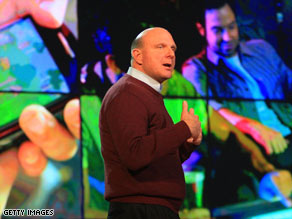
Microsoft CEO Steve Ballmer says Windows 7 will make PCs easier to use.

Microsoft CEO Steve Ballmer says Windows 7 will make PCs easier to use.

As expected, Ballmer announced that Microsoft is releasing a beta version of Windows 7, which will be available for download beginning Friday. The news suggests the world's largest software maker may be giving up efforts to rehabilitate its often-maligned Vista operating system, which was released worldwide in January 2007.

"We are on track to deliver the best version of Windows ever," Ballmer told an audience of several thousand tech professionals and journalists inside a cavernous ballroom at the Venetian hotel. "We're working hard to get it right and get it ready."

Without mentioning the security and compatibility issues that have dogged Vista, Ballmer promised that Windows 7 will make PCs faster and easier to use. He didn't offer a timetable for its official release, although Windows Vista went on sale more than two years after it was issued in beta form.

Early reviews of Windows 7, which was leaked to the Internet in beta form in late December, have been positive.

The forthcoming operating system will have touch-screen capability, side-by-side windows for comparison shopping and a "Peek" feature that makes open windows transparent, allowing users to see the icons on their desktop.

"Windows 7 makes it easier to move between the things on your desktop," said Microsoft group project manager Charlotte Jones, who gave a brief demonstration of the system on the hall's giant display screens. Jones said the new system also makes it easier to send files back and forth between home computers.


Read the full article here.

Tuesday, October 28, 2008

First look at Windows 7's User Interface


"At PDC today, Microsoft gave the first public demonstration of Windows 7. Until now, the company has been uncharacteristically secretive about its new OS; over the past few months, Microsoft has let on that the taskbar will undergo a number of changes, and that many bundled applications would be unbundled and shipped with Windows Live instead. There have also been occasional screenshots of some of the new applets like Calculator and Paint. Now that the covers are finally off, the scale of the new OS becomes clear. The user interface has undergone the most radical overhaul and update since the introduction of Windows 95 thirteen years ago.

First, however, it's important to note what Windows 7 isn't. Windows 7 will not contain anything like the kind of far-reaching architectural modifications that Microsoft made with Windows Vista. Vista brought a new display layer and vastly improved security, but that came at a cost: a significant number of (badly-written) applications had difficulty running on Vista. Applications expecting to run with Administrator access were still widespread when Vista was released, and though many software vendors do a great job, there are still those that haven't updated or fixed their software. Similarly, at its launch many hardware vendors did not have drivers that worked with the new sound or video subsystems, leaving many users frustrated.

While windows 7 doesn't undo these architectural changes—they were essential for the long-term health of the platform—it equally hasn't made any more. Any hardware or software that works with Windows Vista should also work correctly with Windows 7, so unlike the transition from XP to Vista, the transition from Vista to 7 won't show any regressions; nothing that used to work will stop working."

To read more and to view more screen shots of Windows 7 UI, please click here.

Wednesday, July 23, 2008

MS Offers 1st Hints at Anti-Apple Marketing Blitz for Vista

Microsoft this week offered a window into the first phase of a mega million dollar advertising campaign designed to clear up 'misconceptions' about the quality of its Windows Vista operating system exacerbated by in-your-face marketing efforts on the part of longtime rival Apple.The first series of ads in the campaign were reportedly met with rave reviews last week when they were previewed at Microsoft’s employees-only Global Exchange conference.

read more | digg story

Tuesday, July 15, 2008

OpenOffice 3.0 Promises to Bash Office

OpenOffice is the result of over twenty years' software engineering. Designed from the start as a single piece of software, it has a consistency other products cannot match. A completely open development process means that anyone can report bugs, request new features, or enhance the software. The result: OpenOffice does everything you want your office software to do, the way you want it to.

Easy to Use

OpenOffice is easy to learn, and if you're already using another office software package, you'll take to OpenOffice straight away. Our world-wide native-language community means that OpenOffice is probably available and supported in your own language. And if you already have files from another office package - OpenOffice will probably read them with no difficulty.

It's Free
Best of all, OpenOffice can be downloaded and used entirely free of any licence fees. OpenOffice is released under the LGPL licence. This means you may use it for any purpose - domestic, commercial, educational, public administration. You may install it on as many computers as you like. You may make copies and give them away to family, friends, students, employees - anyone you like.


read more

Monday, June 2, 2008

Windows Touch Screen Operating System

CNN's Technology page has released an article mentioning a sneak peek at Microsoft's latest operating system and a special feature planned to be included.

“Microsoft Corp. said Tuesday that its next operating system will be made for touch-screen applications, an alternative to the computer mouse, and its top executives reaffirmed interest in joining forces with Yahoo Inc. Microsoft Chief Executive Officer Steve Ballmer unveiled the iPhone-like touch-screen feature at The Wall Street Journal's "D: All Things Digital" conference, calling it "just the smallest snippet" of the Windows 7 operating system slated for release in late 2009. A Microsoft employee showed possible applications like enlarging and shrinking photos and navigating a map of San Diego by stroking the screen. Microsoft Chairman Bill Gates framed the new feature as an evolution away from the mouse. "Today almost all the interaction is keyboard-mouse," Gates said. "Over years to come, the role of speech, vision, ink - all of those - will be huge.”

To read more of this article, please click here.